Tails Best Practices (computer privacy)
Web PDF • Imposed PDF• Raw TXT (OCR)

![Digital Signatures Alice 1am sending Signing 1008C to Bob. [ | (Encrypion) 4 DFCD3454. BBEA7BA Bob \ 1am sending Verification 4 100 BTC to Bob. [“#—] ecryption) Aices Public Key Tails signs their releases, and only they can do this because only they have their private key. However, I can verify that this signature is valid by having a copy of their public key. Now I’ll explain the gpg com- ‘mands in the Tails verification instructions™. Step: Generate a Key-P: Tails recommends this Riseup guide™ to generate your own key-pair. - gpg --gen-key will prompt you for some configuration options and then generate your key-pai. “tails net/installexpert/index.en html eup.net/en/security/mes command-line e-security/openpgp/gpi-keystusing-the-linux 37](tails-best-practices-computer-privacy-anarsec 37.png)
![can verify the checksum™® of a file using either a GUI (the GtkHash program) or a CLI command (sha2565un). For more information, see Linux Essentials™". The Tech Learning Collective’s “Foundations: Linux Journey” course on the command line™ is our recommended introduction to using the CLI/terminal Correlation Attack An end-to-end correlation attack is a theoretical way that a global ad- versary could break the anonymity of the Tor network’. For more in- formation, see Protecting against determined, skilled attackers"” and Make Correlation Attacks More Difficult™™. For research papers on the subject, see Thirteen Years of Tor Attacks’" and the design proposal on information leaks in Tor"™" Digital Signatures Digital signatures are based on public-key cryptography’. A private Key is used to digitally sign data, while the corresponding public key is used by third parties to verify the signature. Before a public key is used to verify a signature, its authenticity should be verified. To learn more, watch this video™. For a more detailed look, see De- fend Dissent: Authenticity through Cryptographic Signing™** or our GPG explanation™”. " anarsec guide/postslinux/#the-command-line-interface “1echleamingeollctive.com/foundations linu:-journey/the-shell “anarsec guide/posts/ails-best/#2-protecting-against-determined-skilled-at- tackers “anarsec guide/posts/ails/#make-correlation-attacks-more-difficult igithub.comy Attacks-on-Tor/ Attacks-on Tor#correlation-attacks “spectorproject.org/propasals/34é-protocol-info-leaks htuml 9y outube.com/watch?v=522¢] 1eVLTUlisten=false topen oregonstate educationdefenddissent/chapter/cryptographic-signing/ “anarsec guide/posts/tails-best ¥appendix-gpg-explanation a2](tails-best-practices-computer-privacy-anarsec 42.png)



Tails Best Practices
‘This version of the zine was last edited on 2024-11-25. Visit
anarsec guide to see whether it has been updated since.
‘The dagger symbol * on a word means that there is a glossary entry
for it. Aiferri corti.
Contents
Protecting your identity when using Tails
1. Sharing files with metadata
2. Using Tails for more than one purpose at a time.
Limitations of the Tor network
1. Hiding that you are using Tor and Tails
2. Protecting against determined, skilled attackers
Reducing risks when using untrusted computers
1. Installing from an infected computer
2. Running Tails on a computer with a compromised BIOS,
firmware, or hardware
Using A Write-Protect Switch
Unlocking the switch
“Personal data” USBs
Phishing Awareness
Files
Links
Watering hole attacks
Encryption
Passwords
Encrypted volumes
Encrypted Communication
To Conclude
Appendix: GPG Explanation
Step: Generate a Key-Pair
Step: Verify the Tails public key
Step: Verify the downloaded Tails img file
Appendix: Recommendations
Your Phone
Your Computer
Encrypted Messaging
Storing Electronic Devices
Appendix: Glossary
1
1
15
20
22
2
2
27
28
29
30
30
33
34
35
35
37
38
38
38
39
I
I
1
1
Asynchronous Communication
Brute-force attack
Command Line Interface (CLI)
Correlation Attack
Digital Signatures
Encryption
Forward secrecy
GnuPG / OpenPGP
LUKS
Metadata
Open-source
Operating system (0S)
Passphrase
Password
Phishing
Physical attacks
Public-key cryptography
Remote attacks
Spear phishing
Synchronous communication
Threat model
Tor network
1
1
1
12
12
3
3
3
a4
a4
a4
5
5
5
5
16
6
a7
a7
a7
a7
13
All anarchists should know how to use Tails — this text describes some.
additional precautions you can take that are relevant to an anarchist
threat model. Not all anarchist threat models are the same, and only
you can decide which mitigations are worth putting into practice for
your activities, but we aim to provide advice that is appropriate for
high-risk activities like claiming an action. If you are new to Tails,
start with Tails for Anarchists”.
We'll begin by looking at the three topics covered on the Tails Warn-
ings page’: protecting your identity, limitations of the Tor network,
and untrusted computers.
Protecting your identity when
using Tails
anarsec. guide/posts/tail
“tails.net/doc/about/warnings/indes.n himl
5
Tails is designed to hide your identity. But some of your ac-
tivities could reveal your identity:
1. Sharing files with metadata', such as date, time, location,
and device information
2. Using Tails for more than one purpose at a time
1. Sharing files with metadata
You can mitigate this first issue by cleaning metadata from files be-
fore sharing them:
+ Tolearn how, see Remove Identifying Metadata From Files”.
2. Using Tails for more than one purpose at a
time
You can mitigate this second issue by what's called “compartmental-
ization”
+ Compartmentalization® means keeping different activities or projects
separate. If you use Tails sessions for more than one purpose at a
time, an adversary could link your different activities together. For
example, if you log into different accounts on the same website in a
single Tails session, the website could determine that the accounts
are being used by the same person. This is because websites can tell
when two accounts are using the same Tor circuit
+ To prevent an adversary from linking your activities while using
Tails, restart Tails between different activities. For example, restart
Tails between checking different project emails,
+ Tails is amnesiac by default, o to save any data from a Tails session,
you must save it to a USB. If the files you save could be used to link
your activities together, use a different encrypted (LUKS") USB stick
anarsec. guide/posts/metadata/
“notrace how/threat-ibrary mitigations/compartmentalization html
6
for each activity. For example, use one Tails USB stick for moderat-
ing a website and another for researching actions. Tails has a feature
called Persistent Storage, but we do not recommend using it for data
storage, which we explain below’.
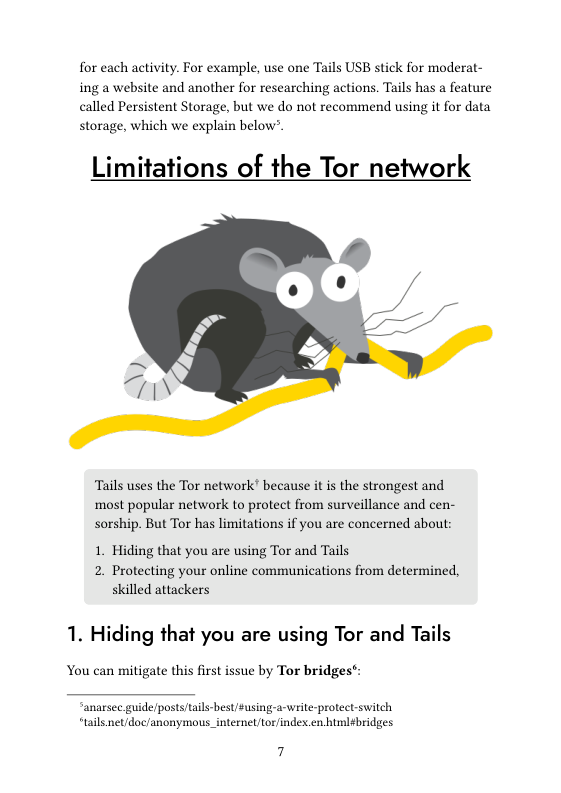
Limitations of the Tor network
Tails uses the Tor network’ because it s the strongest and
most popular network to protect from surveillance and cen-
sorship. But Tor has limitations if you are concerned about:
1. Hiding that you are using Tor and Tails
2. Protecting your online communications from determined,
skilled attackers
1. Hiding that you are using Tor and Tails
You can mitigate this first issue by Tor bridge:
“anarsec.guide/posts/tails-best/Susing-a-write-protect switch,
“tails net/doc/anonymous_internel/tor/index.en himl¢bridges
7
+ Tor Bridges are secret Tor relays that hide your connection to the
Tor network. However, this is only necessary where connections to
Tor are blocked, such as in heavily censored countries, by some pub-
lic networks, or by some parental control software. This is because
Tor and Tails don't protect you by making you look like any other
Internet user, but by making all Tor and Tails users look the same. It
becomes impossible to tell who is who among them.
2. Protecting against determined, skilled
attackers
An end-to-end correlation attack! is a theoretical way that a global ad-
versary could break Tor's anonymity:
A powerful adversary, who could analyze the timing and
shape of the traffic entering and exiting the Tor network,
might be able to deanonymize Tor users. These attacks are
called end-to-end correlation attacks, because the attacker has
to observe both ends of a Tor circuit at the same time. ..
End-to-end correlation attacks have been studied in research
papers, but we don’t know of any actual use to deanonymize
Tor users:
Non-Targeted and Targeted Correlation Attacks
As described in the quotation above, a global adversary (i. the NSA)
may be capable of breaking Tor through a correlation attack. If this
happens, the Internet address you used in a coffee shop without CCTV
cameras will only lead to your general area (e.g. your city) because it is
not associated with you. Of course, this is less true if you use the loca-
tion routinely. Correlation attacks are even less feasible against con-
nections to an .onion address because you never leave the Tor net-
work, so there is no “end” to correlate with through network traffic
analysis (if the server location is unknown to the adversary). It is
worth emphasizing that “End-to-end correlation attacks have been
studied in research papers, but we don’t know of any actual use to
deanonymize Tor users”
What we will term a “targeted” correlation attack is much more likely
because a non-global adversary (i. local law enforcement) s capable
of it if you are already in their sights and a target of physical surveil-
lance” and/or digital surveillance”. This is a subtype of correlation at-
tack where the presumed target is already known, thus making the at-
tack easier to achieve because it vastly reduces the amount of data to
filter through for correlation. A non-targeted correlation attack used to
deanonymize a Tor user is unprecedented in current evidence used in
court, although a “targeted” correlation attack has been used” as cor-
roborating evidence — a suspect had already been identified, which al-
lowed investigators to correlate their observed footprint with specific
online activity. Specifically, they correlated Tor network traffic coming
from the suspect’s house with the times their anonymous alias was on-
line in chatrooms.
To explain how this works, it helps if you have a basic understanding
of what Tor information is visible to various third parties — see the
EFF's interactive graphic®”. For a non-targeted correlation attack, the
investigator will need to start from after Tor’s exit node: take the spe-
cific online activity coming from the exit node and try to correlate it
‘with an enormous amount of global data that is entering Tor entry
nodes. However, if a suspect is already identified, the investigator can
instead do a “targeted” correlation attack and start from before Tor's en-
try node: take the data entering the entry node (via the suspect's physi-
cal or digital footprint) and try to correlate it with specific online activ-
ity coming from an exit node.
"notrace how/threat-library techniques/physical-surveillancecovert html
*notrace how/threat-library techniques targeted-digital-surveillance himl
*medium.combeyond-install-tor-signal/case-le-eremy-hammond-514facc780b8
“efLorg/pagestor-and-htps
For your physical footprint, a surveillance operation can observe you
£0 10 a cafe regularly, then try to correlate this with online activity
they suspect you of (for example, i they suspect you are a website
moderator, they can try to correlate these time windows with web
‘moderator activity). For your digital footprint,if you are using Internet
from home, an investigator can observe all your Tor traffic and then
try to correlate this with online activity they suspect you of. For your
specific online activity, a more sophisticated analysis would involve
logging the connections to the server for detailed comparison, and a
simple analysis would be something that is publicly visible to anyone
(such as when your alias is online in a chatroom, or when a post is
published to a website)
You can mitigate the techniques available to powerful adversaries by
prioritizing .onion links when available, by taking the possibil-
ity of targeted surveillance into account and by using an Inter-
net connection that is not tied to your identity.
An Internet connection not tied to your identity
Using an Internet connection that is not tied to your identity means
that if an attack on the Tor network succeeds, it still doesn't
deanonymize you. You have two options: using Wi-Fi from a public
space (like going to a cafe without CCTV cameras), or using a Wi-Fi
antenna through a window from a private space.
Working from a public space
If you only need to use the Internet irregularly, such as to submit a
communique or do action research, you can do surveillance detec-
tion"" and anti-surveillance'* before going to a coffee shop, just
like you would prior to a direct action. See “How to submit an anony-
“notrace how threat-library/mitigationssurveillance-detection himl
“notrace howthreat-library/mitigations/anti-surveillance html
“notrace how/resources/show-submit
10
mous communiqué and get away with it™ for more information on
‘what submilting a communique involves.
When using Wi-Fi in a public space, keep the following operational se-
curity considerations in mind:
+ Timing is a relevant consideration. If you want to submit a report-
back the morning after a riot, or a communique shortly after an ac-
tion (times when there may be a higher risk of targeted surveil-
lance), consider waiting instead. In 2010, the morning after a bank
arson in Canada, police surveilled a suspect as he traveled from his
home to an Internet cafe, and watched him post the communique
and then bury the laptop in the woods. More recently, investigators
physically surveilling an anarchist in France™ installed a hidden
camera to monitor access to an Internet cafe near the comrade’s
home and requested CCTV footage for the day an arson commu-
nique was sent
+ Do not get into a routine of using the same cafes repeatedly if you
can avoid it. The more regularly you use a space, the more the Inter-
net is tied to your identity. Additionally, if a surveillance effort
knows your destination, anti-surveillance will not be effective.
+ If you have to buy a coffec to get the Wi-Fi password, pay in cash!
+ Position yourself with your back against a wall so that no one can
“shoulder surf” to see your screen, and ideally install a privacy
sereen® on your laptop. If you write a communique in an offline
Tails session before your trip to the public space, you only need a
few minutes locked in a public bathroom to send it in.
+ If coffee shops without CCTV cameras are few and far between, you
can try accessing a coffee shop's Wi-Fi from outside, out of view of
the cameras
- Maintain situational awareness and be ready to pull out the Tails
USB to shut down the computer at a moment's notice. It is very diffi-
cult to maintain adequate situational awareness while staying fo-
“notrace how/resources/sivan
“anarsec guide/posts/tails/#privacyscreen
1
cused on your Tails session — consider asking a trusted friend to
hang out who can dedicate themselves to keeping an eye on your
surroundings. If the Tails USB is removed, Tails will shut down and
overwrite the RAM with random data™. Any LUKS USBs that were
unlocked in the Tails session will now be encrypted again. Note that
Tails warns” “Only physically remove the USB stick in case of emer-
gency as doing so can sometimes break the file system of the Persis-
tent Storage”
~ One person in charge of a darknet marketplace had his Tails com-
puter seized while distracted by a fake fight next to him. Similar
tactics have been used in other police operations™. If his Tails
USB had been attached to a belt with a short piece of fishing line,
the police would most likely have lost all evidence when the Tails
USB was pulled out. A more technical equivalent is BusKill”
however, we only recommend buying this in person® or 3D print-
ing it This is because any mail can be intercepted® and altered,
‘making the hardware malicious™
Working from a private space
If you need to regularly use the Internet for projects like moderating a
website or hacking, going to a new Wi-Fi location after doing surveil-
lance countermeasures might not be realistic on a daily basis. Addi-
tionally, a main police priority will be to seize the computer while it is
unencrypted, and this is much easier for them to achieve in a public
space, especially if you are alone. In this scenario, the ideal mitigation
is to use a Wi-Fi antenna positioned behind a window in a pri.
vate space to access from a few hundred metres away — a physi-
tais net/doc/advanced_topies/cold_boot_attacks/index.en hml
“tails net/doc/first_steps/shutdown/index en html
5dys2p. com/en/2023-05-luks-security htmlattacks
“buskillin/tails/
“buskilln/leipzig-proxystore/
“buskillin/3d-print-2023-08
“does buskill n/buskill-spp/en/stable/ fag html#q-what-about-iterdiction
en.wikipedia.org/wiki/BadUSB
12
cal surveillance effort won't observe you entering a cafe or be able to
easily seize your powered-on laptop, and a digital surveillance effort
won't observe anything on your home Internet. To protect against hid-
den cameras™, you should still be careful about where you position
your screen.
If a Wi-Fi antenna is too technical for you, you may even want to use
your home internet for some projects that require frequent internet
access. This contradicts the previous advice to not use an Internet con-
nection that is tied to your identity. It's a trade-off: using Tor from
home avoids creating a physical footprint that is so easy to observe, at
the expense of creating a digital footprint which is more technical to
observe, and may be harder to draw meaningful conclusions from.
There are two main deanonymization risks to consider when using
your home internet: that the adversary deanonymizes you through a
Tor correlation attack, or that they deanonymize you by hacking your
system (such as through phishing™) which enables them to bypass
Tor™. To make both of these attacks more difficult, we recommend
connecting to a VPN before connecting to Tor (ie. You — VPN — Tor
— Internet”") when using Tails from home, which requires running
the VPN from your networking device (cither a router or a hardware
firewall). For more information on the rationale, see Privacy Guides™.
To summarize
For sensitive and irregular Internet activities, use an Internet connec-
tion from a random cafe, preceeded by surveillance detection and anti-
surveillance. For activities that require daily Internet access such that
taking surveillance countermeasures and finding a new cafe isn't real-
istic, it's best to use a Wi-Fi antenna, If this is too technical for you, us-
ing your home Wi-Fi is an option, but this requires trusting Tor's re-
“notrace how/earsandeyes
“anarsee guide/posts tails-best sphishing-awarenes
*ranarsee guide/posts/qubes/#when-to-use-tails-vs-qubes-os
“gilab.torproject orglegacy trac/-/wikis/doc/TorPlusVPNyou-vpnssh-tor
“iprivacyguides org/en/advanced tor-overview#salely-connecting-to-tor
13
silience to correlation attacks, the measures you take against being
hacked, and your VPN provider
Reducing risks when using
untrusted computers
Tails can safely run on a computer that has a virus. But Tails
cannot always protect you when:
1. Installing from an infected computer
2. Running Tails on a computer with a compromised BIOS,
firmware, or hardware
1. Installing from an infected computer
You can mitigate this first
install Tails:
e by using a computer you trust to
1
+ According to our recommendations (rec), this would ideally be a
Qubes OS™ system, as it is much harder to infect than a normal
Linux computer.
+ Use the “Terminal” installation method “Debian or Ubuntu using the
command line and GnuPG™, as it more thoroughly verifies the in-
tegrity of the download using GPG'. If using the command line’ is
over your head, learn the basics of the command line with Linux Es-
sentials™ and sce the Appendix below™.
+ Once installed, do not plug your Tails USB stick (or any LUKS' USBs
used during Tails sessions) into any other computer; if the computer
is infected, the infection can spread to the USB”.
2. Running Tails on a computer with a
compromised BIOS, firmware, or hardware
This second issue requires several mitigations. Let's start with a few
definitions.
+ Software is the instructions for the computer, which are written in
“code”.
+ Hardware is the physical computer you are using
+ Firmvware s the low-level software that's embedded in a piece of
hardware; you can simply think of it as the glue between the hard-
ware and higher-level software of the operating system. It can be
found in several different components™ (hard drives, USB drives,
graphics processor, etc.).
“anarsee guide/posts/qubes/
*tails net/install/expertindex.en hul
“anarsee guide/posts linus
“anarsec guideposts/tails-best/$appendis-gpg-explanation
»enwikipedia.org/wiki/BadUSB
“hicksecure.com/wiki
Firmware_Security_and_Updates¢Firmware_
\ Personal_Computers
15
+ BIOS s the specific firmware that's embedded in the “motherboard”
hardware and responsible for booting your computer when you
press the power button.
Our adversaries have two categories of attack vectors: physical at-
tacks! (via physical access) and remote attacks' (via the remote access
of the Internet). An adversary with physical access can compromise
the software (e.. by replacing the operating system with a malicious
version), the hardware (e.g. by adding a keylogger), and the firmware
(e by replacing the BIOS with a malicious version). An adversary
‘with remote access starts by hacking you (a software compromise) and
can then proceed to compromise the firmware.
If an adversary has compromised the hardware or firmware of a lap-
top, this would also compromise a Tails session, given that the operat-
ing system would be running on a malicious foundation.
Not everyone will need to apply all of the advice below. For example, if
you're only using Tails for anonymous web browsing and writen cor-
respondence, some of this may be overkill. However, if you're using
Tails to claim actions that are highly criminalized, a more thorough
approach is likely relevant
To mitigate against physical attacks:
+ First, get a fresh computer. A laptop from a random refurbished
computer store is unlikely to already be compromised””. Buy your
computer with cash 5o it cannot be traced back to you, and in person
because mail can be intercepted — a used Thinkpad is a cheap and
reliable option. It is best to use Tails with a dedicated laptop, which
prevents the adversary from targeting the firmware through a less
secure operating system or through your normal non-anonymous
activities. Another reason to have a dedicated laptop s that if some-
thing in Tails breaks, any information that leaks and exposes the lap-
“arstechnica.comtech-policy/2014/05/photos-of-an-nsa-upgrade-factory-show-
o-touter-getting-implant/
16
top won't automatically be tied to you and your daily computer ac-
tivities.
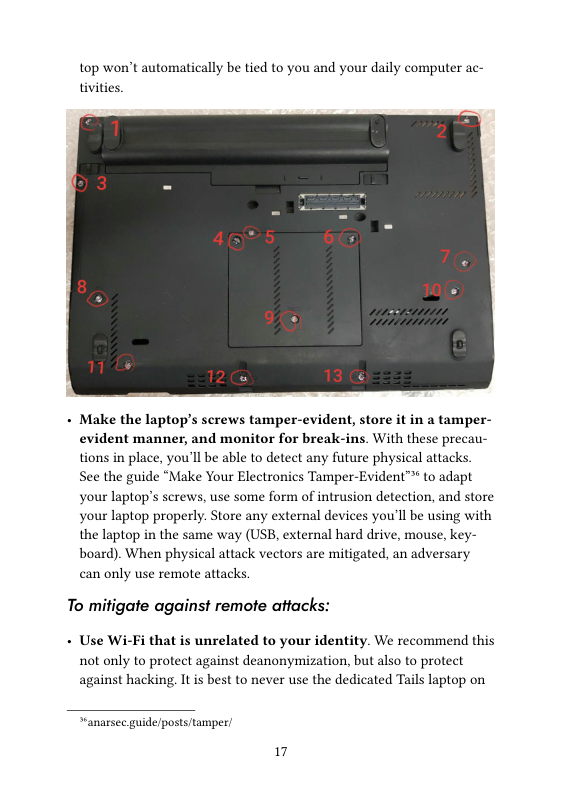
- Make the laptop’s screws tamper-evident, store it in a tamper-
evident manner, and monitor for break-ins. With these precau-
tions in place, you'll be able to detect any future physical attacks.
See the guide “Make Your Electronics Tamper-Evident™ to adapt
your laptop’s screws, use some form of intrusion detection, and store
your laptop properly. Store any external devices you'll be using with
the laptop in the same way (USB, external hard drive, mouse, key-
board). When physical attack vectors are mitigated, an adversary
can only use remote attacks,
To mitigate against remote attacks:
- Use Wi-Fi that is unrelated to your identity. We recommend this
not only to protect against deanonymization, but also to protect
against hacking. It is best to never use the dedicated Tails laptop on
“anarsec guide/posts/tamper
17
your home Wi-Fi. This makes the laptop much less accessible to a
remote attacker than a laptop that is regularly connected to your
home Wi-Fi. An attacker targeting you needs a starting point, and
your home Wi-Fi is a pretty good one.
Remove the hard drive — it's easier than it sounds. If you buy the
laptop, you can ask the store to do it and potentially save some
money. If you search on youtube for “remove hard drive” for your
specific laptop model, there will probably be an instructional video.
Make sure you remove the laptop battery and unplug the power cord
first. We remove the hard drive to completely eliminate the hard
drive firmyware, which has been known to be compromised by hack-
ers”. A hard drive is part of the attack surface and it is unnecessary
ona live system like Tails that runs from a USB.
Consider removing the Bluetooth interface, camera, and mi-
crophone while you're at it, although this is more involved — you'll
need the user manual for your laptop model. The camera can at least
be “disabled” by putting a sticker over it. The microphone is often
connected to the motherboard via a plug — in this case just unplug
it If this is not obvious, or if there is no connector because the cable
is soldered directly to the motherboard, or if the connector is needed
for other purposes, cut the microphone cable with a pair of pliers.
The same method can be used to permanently disable the camera. It
is also possible to use Tails on a dedicated “offline” computer by re-
moving the network card as well. Some laptops have switches on the
case that can be used to disable the wireless interfaces, but for an
“offline” computer it s preferable to actually remove the network
card
Establish boot integrity by replacing the BIOS with Heads™.
Security researchers demonstrated an attack on the BIOS firmware
of a Tails user, allowing them to steal GPG keys and emails. Unfortu-
nately, the BIOS cannot be removed like the hard drive. It is needed
Vvired.com/2015/02/nsa- frmware-hacking
Hosresearchnet/
*youtube.com/watch?
NYsfUNegEA
18
to turn on the laptop, so it must be replaced with open-source’
firmware. This is an advanced process because it requires opening
the computer and using special tools. Most anarchists will not be
able to do this themselves, but hopefully there is a trusted person in
your networks who can set it up for you. The project is called Heads
because it's the other side of Tails — where Tails secures software,
Heads secures firmware. It has a similar purpose to the Verified
Boot* found in GrapheneOS, which establishes a full chain of trust
from the hardware. Heads has limited compatibility™, so keep that in
mind when buying your laptop if you plan to install it — we recom-
mend the ThinkPad X230 because it's less involved to install than
other models. The CPUs of this generation are capable of effectively
removing the Intel Management Engine® when flashing Heads, but
this is not the case with later generations of CPUs on newer comput-
exs. Heads can be configured to verify the integrity and authenticity
of a Tails USB — see the documentation®, preventing it from booting
ifit has been tampered with. Heads protects against physical and re-
mote classes of attacks on the BIOS firmware and the operating sys-
tem software! If Heads ever detects tampering, you should immedi-
ately treat the device as untrusted. Forensic analysis** may be able to
reveal how the compromise occured, which helps to prevent it from
happening again. You can get in touch with a service like Access
Now's Digital Security Helpline®, though we recommend not send-
ing them any personal data.
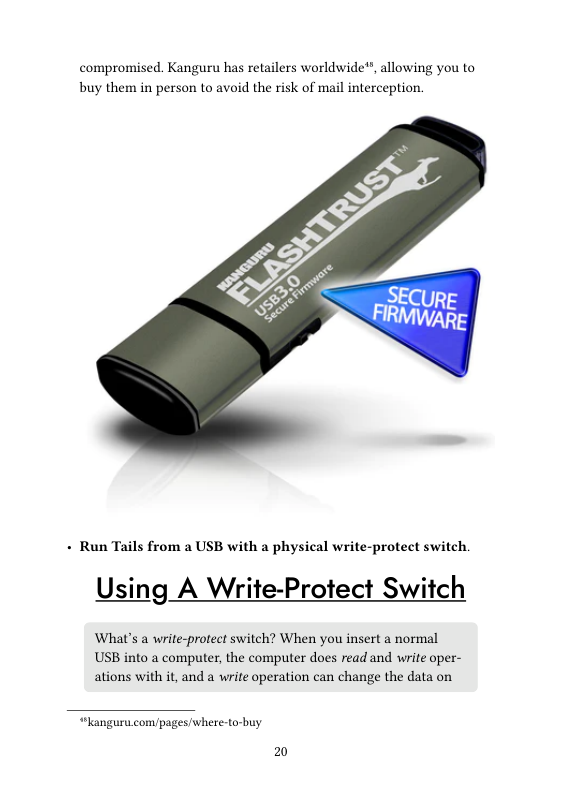
+ Use USBs with secure firmware, such as the Kanguru
FlashTrust*, so that the USB will stop working" if the firmware is
“privacyguides org/en/os/android-overview/éverified-boot
“losresearch.net/Prerequisites#supported-devices
“enwikipedia.org/wikil
Intel Management_Engine#Assertions_that_ME_is_a_backdoor
“asresearchnet/InstallingOS/#generic-os-installation
“notrace how/threat-library/mitigations/computer-and-mobile-forensics html
“accessnoworg/help
“kanguru.com/products kanguru-flashtrust-secure-frmware-ush-3-0-flash-drive.
“anguru.com/blogs/gurublog/1523587-prevent-badusb-usb-firmware-protec-
tionfrom kanguru
19
compromised. Kanguru has retailers worldwide™, allowing you to
buy them in person to avoid the risk of mail interception.
- Run Tails from a USB with a physical write-protect switch.
Using A Write-Protect Switch
What's a write-protect switch? When you insert a normal
USB into a computer, the computer does read and write oper-
ations with it, and a write operation can change the data on
“languru. com/pages/where-to-buy
20
the USB. Some special USBs developed for malware analysis
have a physical switch that can lock the USB, so that data can
be read from it, but no new data can be written to it.
If your Tails USB stick has a write-protect switch like the Kanguru
FlashTrust”, when the switch is locked you are protected from an at-
tacker compromising the Tails software stored on the USB. This is crit-
ical. To compromise your Tails USB stick, an attacker would need to be
able to write to it. This means that even if a Tails session is infected
with malware, your Tails USB s immutable, so the compromise cannot
carry over to subsequent Tails sessions (‘malware persistence”) by
modifying operating system files. The only other way to establish
“malware persistence” s firmware compromise, which you have al-
ready mitigated.
Note that Heads firmware makes a write-protect switch unnecessary
because it can be configured to verify the integrity and authenticity of
‘your Tails USB* before booting,
If you aren't using Heads and you are unable to obtain a USB with a
‘write-protect switch, you have three options
1) Install Tails on a SD card, and use a USB 3.0 to SD card adapter, be-
cause SD cards have a write-protect switch.
2) Burn Tails to a new DVD-R/DVD+R® (write once) for each new
version of Tails — this is quite inconvenient. Don't use DVDs la-
beled “DVD+RW” or “DVD+RAM, which can be rewritten
3) Boot Tails with the toran option, which loads Tails completely into
memory. Eject the Tails USB at the beginning of your session before
you do anything else (whether it is connecting to the Internet or
plugging in another USB), and then use Tails like normal. How you
“angura.com/products kanguru-flashtrust-secure-frmware-ush-3-0-flash-drive.
“asresearch net/InstallingOS#generic-os-installation
“tails net/install dvd/index en html
21
use the toram option depends on whether your Tails USB boots
with SYSLINUX or GRUB”.
+ For SYSLINUX, when the boot screen appears, press Tab, and
type a space. Type toran and press Enter
+ For GRUB, when the boot screen appears, press e and use the
Keyboard arrows to move to the end of the line that starts with
Uinux. The line is probably wrapped and displayed on multiple
lines, but it is a single configuration line. Type toran and press
F10 or Ctrl+X.
Unlocking the switch
On a USB with a write-protect switch, you will not be able to make
any changes to the Tails USB when the switch is locked. If you can
‘make changes, so can malware. There are only two cases where the
switch must be unlocked:
1. For a dedicated upgrade session.
If you need to upgrade Tails, you can o so in a dedicated session with
the switch unlocked — this is necessary because the upgrade needs to
be written to the Tails USB. Once you are done, you should restart
Tails with the switch locked
2. For a dedicated configuration session, if you decide
to use Persistent Storage.
Persistent Storage™ is a Tails feature that allows data to carry over be-
tween sessions that would otherwise be amnesiac, by saving data onto
the Tails USB itself. Because Persistent Storage requires writing to the
Tails USB, it is generally impractical to use with a write-protect
switch. An alternative to the write-protect switch is using Heads —
Heads verifies the authenticity and integrity of the Tails USB through
“tails net/doe/advanced_topics/boot_options/index.en html
“anarsee guide/posts/tail/soptional create-and-configure-persisient storage
22
a digital signature upon boot, and this makes it safe to write to the
Tails USB, so Persistent Storage will work as expected.
Another reason to avoid using Persistent Storage features is that many
of them store personal data to the Tails USB. If your Tails session is
compromised, the data you access during that session can be used to
tie your activities together. If there is personal data on the Tails USB,
such as an email inbox, compartmentalization of Tails sessions is no
longer possible when Persistent Storage is unlocked. To achieve com-
partmentalization with Persistent Storage unlocked, you would need a
dedicated Tails USB for each identity, and updating them all every
month would be a lot of work.
However, you may want to use some Persistent Storage features that
don't store personal data, such as the additional software feature. This
requires unlocking the switch for a dedicated Persistent Storage con-
figuration session:
+ Start an “unlocked” session, create Persistent Storage™® with addi-
tional software enabled, install the additional software™, and select
to “Install Every Time” when prompted.
+ Now that the configuration is complete, restart Tails into a “locked”
session before actually using the software. Don't set an Administra-
tion password, which is only required during the initial installation.
In a “locked” session, none of the files you work on are saved to the
Tails USB because it is “locked", but now the additional software is
configured to install every time you enter your Persistent Storage
password at the Welcome Screen. To have a “locked” session with
Persistent Storage, the USB switch will need to be switched to the
read-only position after you receive the notification “Additional Soft-
ware installed succesfully” (and before you connect to the Internet)
The Persistent Storage feature is not possible with the DVD or toran
boot option.
“tanarsee guide/posts tailssoptional-create-and-configure-persistent storage
“anarsee guide/posts tails#installing-additional-software
23
“Personal data” USBs
Where can we store personal data for use between Tails sessions if the
‘write-protect switch prevents us from using Persistent Storage? We
recommend storing personal data on a second LUKS USB. This “per-
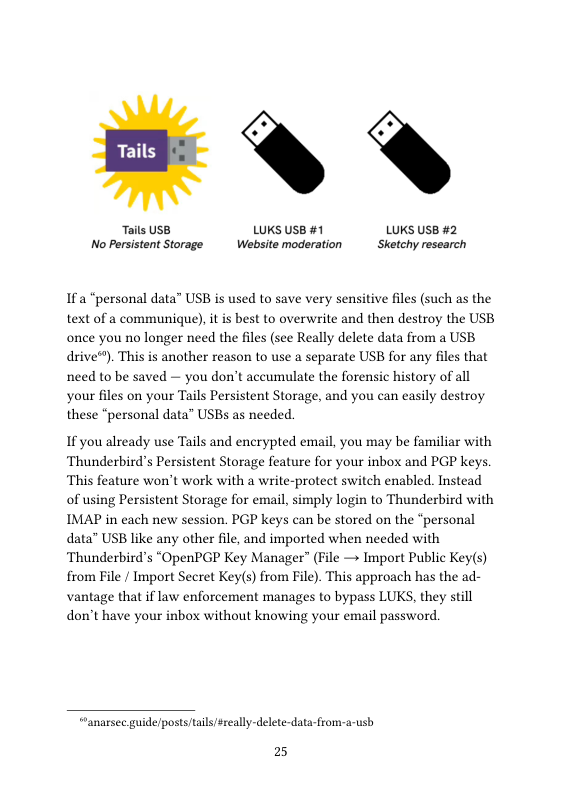
sonal data” USB should not look identical to your Tails USB to avoid
confusion. To create this separate USB, see How to create an encrypted
USB™. If you are reading this from a country like the UK where not
providing encryption passwords can land you in jail, this second drive
should be an HDD containing a Veracrypt Hidden Volume®” (SSD and
USB drives are not suitable for Hidden Volumes™)
‘The compartmentalization approach discussed above™ neatly sepa-
rates different identities by using separate Tails sessions for separate
for example, in Tails session #1 you do website moderation
activities, and in Tails session #2 you do action research activities. This
approach has implications for how you organize your “personal data™
USBs. If the files you save could be used to link your activities to-
gether, use a different “personal data” USB for each activity.
activities
“anarsec guide/posts/tails/show-to-create-an-encrypted-ush
“veracrypLf/en/Hidden’20Volume himl
“IveracrypL/en/Trim200peration bl
““anarsee guide/posts/tais-best/#2-using-tails- for-more-than-one-purpose-at-a-
time
2
Tails USB LUKS USB #1 LUKS USB #2
NoPersistent Storage Website moderation Sketchy research
Ifa “personal data” USB is used to save very sensitive files (such as the
text of a communique), it is best to overwrite and then destroy the USB
once you no longer need the files (see Really delete data from a USB.
drive®). This is another reason to use a separate USB for any files that
need to be saved — you don't accumulate the forensic history of all
your files on your Tails Persistent Storage, and you can easily destroy
these “personal data” USBs as needed
If you already use Tails and encrypted email, you may be familiar with
‘Thunderbird's Persistent Storage feature for your inbox and PGP keys
This feature won't work with a write-protect switch enabled. Instead
of using Persistent Storage for email, simply login to Thunderbird with
IMAP in each new session. PGP keys can be stored on the “personal
data” USB like any other file, and imported when needed with
Thunderbird's “OpenPGP Key Manager” (File — Import Public Key(s)
from File / Import Secret Key(s) from File). This approach has the ad-
vantage that if law enforcement manages to bypass LUKS, they still
don't have your inbox without knowing your email password.
anarsec guidelposts/tils/sreally-delete-data- from-a-ush
25
Phishing Awareness
Let's return to the subject of how an adversary would conduct a re-
mote attack' targeting you or your project for hacking; the answer is
most likely “phishing™". Phishing is when an adversary crafts an email
(or a message in an application) to trick you into revealing information
or to introduce malware onto your machine. Spear phishing! is when
the adversary has done some reconnaissance and uses information
they already know about you to tailor their phishing attack.
Phishing only works if the adversary has a way of sending you a mes-
sage: you don't need to worry about this attack vector for activities
like submitting a communique or doing action research, but it is rele-
vant for public-facing projects that have a communication channel. Be
aware that the “from” field in emails can be spoofed to fool you — PGP
signing® mitigates this to prove that the email is actually from who
you expect it to be from.
You have probably heard the advice to be skeptical about clicking on
links and opening file attachments — this is why. Phishing relies on
your actions to succeed, so your awareness s your best defense.
A malicious file or link works by executing code® on your machine.
For malicious files, the code executes when the file is opened. For mali-
cious links, the code executes when you visit the website, usually with
the help of JavaSeript. The point of this code execution is to give an
entry point (“inital access”) to infect your machine with malware.
Tails protects against malware deanonymizing you by forcing all inter-
net connections through the Tor network. However, once the adver-
sary has “initial access” they will try to further their attack;
+ to make the infection persistent”,
+ toinstall a screen or key logger®,
“lanarsec guide/posts/eZeefpgp-email
“ren.wikipedia.org/wiki/Asbitrary_code_exceution
“attack mitre.org tacties/ TAOOO3!
2
+ to exfiltrate your data®”,
+ to achieve “privilege escalation™
Privilege escalation (ie. going from an unprivileged user to the admin-
istration user on the system) s usually necessary to bypass Tor. Tails
does not have a default Administration password (it must be set on the
session’s Welcome Screen if needed) in order to make “privilege esca-
lation” more difficult.
‘The most recent Tails audit”” found several “privilege escalation vul-
nerabilities” and even a vulnerability that leaked the IP address from
the non-privileged user. If esilience to malware attacks is an impor-
tant part of your threat model, see When to Use Tails vs. Qubes 05"
Files
In 2017, the FBI and Facebook worked together to develop a malicious
video file that deanonymized a Tails user* after he opened it while us-
ing his home Wi-Fi
For untrusted attachments, you would ideally use Dangerzone™ to
sanitize all files sent to you before opening them. Dangerzone
takes untrusted PDFs, office documents, or images and turns them into
trusted PDFs. See the documentation™ for how to install Dangerzone
on Tails — unfortunately, it currently requires using the command
line.
If you are not using Dangerzone, it is best to open untrusted files
“lattack mitre.org/tactics/ TA00S)
“attack mitre.org/tactics/ TAOOL0
“ren.wikipedia.org/wiki/Privilege_escalation
“tails net/news/audit_by_ROS/index.en html
““anarsee guide/posts/qubes#when-to-use-tals-vs-qubes-os.
“vice.com/en/aticle/v7gdob/facebook-helped-fbi-hack-child-predator-buster-
hemandez
“dangerzone.rocks/
“tails net/doc/persistent_storage/additional_software/dangerzone/indexen html
27
in a dedicated ‘offline mode”™ Tails session. This will prevent code
execution from establishing a remote connection to the adversary,
‘which is usually needed to further the attack. Shutting the session
down immediately afterward will minimize the chance of malware
persisting. However, unless you use Dangerzone to sanitize the files,
they will remain untrusted.
Links
With untrusted links, there are two things you must protect: your
anonymity and your information.
+ Itis best to open untrusted links in a dedicated Tails session
without unlocked Persistent Storage or attached “personal
data” USBs. You can put the link on a Riseup Pad to access it
+ Use Tor Browser on the Safest security setting™ The vast ma-
jority of exploits against Tor Browser will not work with the Safest
setting
+ Manually copy and paste the address into your browser, and
retype the domain. For example, after pasting the link
anarsec. guide/posts/tails, retype anarsec.guide yourself. Do
not click through a hyperlink (i.e. always copy and paste) because it
can be used to mislead you about where you are going. Retyping the
domain protects against “typo-squatting” (mailriseup.net instead of
mail riseup.net) as well as “homograph attacks™™ (where Cyrillic let-
ters are substituted for normal letters).
+ Never follow a shortened link (e.¢ a site like bitly that takes long
web addresses and makes a short one) because it cannot be verified
before redirection. Unshortenme” can reveal shortened links
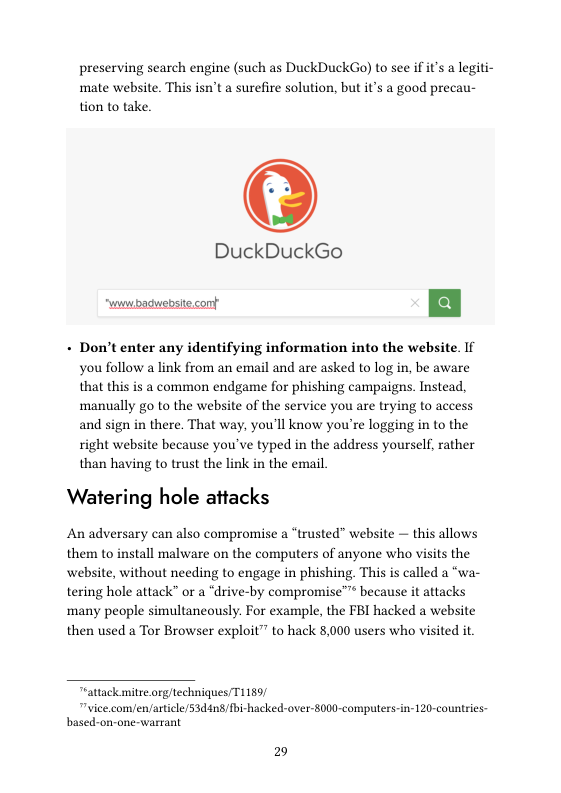
+ If you don’t recognize the domain, research it. Search for the
domain with the domain name in quotation marks using a privacy-
“tails net/doe/first_steps/welcome_screen/indexen htmlsindexsh
anarsee guide/posts/tais/#tor-browser-security-seltings
“theguardian. comtechnology/2017/apr/19/phishing-url-trick-hackers
“unshorten.me/
2
preserving search engine (such as DuckDuckGo) to see if it's a legiti-
mate website. This isn't a surefire solution, but it's a good precau-
tion to take.
DuckDuckGo
- Don’t enter any identifying information into the website. If
you follow a link from an email and are asked to log in, be aware
that this is a common endgame for phishing campaigns. Instead,
‘manually go to the website of the service you are trying to access
and sign in there. That way, you'll know you're logging in to the
right website because you've typed in the address yourself, rather
than having to trust the link in the email.
Watering hole attacks
An adversary can also compromise a “trusted” website — this allows
them to install malware on the computers of anyone who visits the
website, without needing to engage in phishing. This is called a “wa-
tering hole attack” or a “drive-by compromise™™ because it attacks
many people simultaneously. For example, the FBI hacked a website
then used a Tor Browser exploit” to hack 8,000 users who visited it
Tattack mitre.org/techniques/T1159/
"vice.com/en/aticle/53d4n8/bi-hacked-over-8000-computers-in-120-countries-
based-on-one-warrant
29
This is why its important to use Tor Browser on the Safest security
setting™ by default, even for “trusted” websites, to greatly reduce the
risk of a successful malware attack on Tor Browser.
Encryption
Passwords
Encryption’ is the only thing standing in the way of our adversaries
reading all our data, if i’ used well. The first step in securing your en-
cryption is to make sure that you use very strong passwords — most
passwords don't need to be memorized because they are stored in a
password manager called KeePassXC, so they can be completely ran-
dom. Never reuse a password for multiple things (‘password recy-
cling”) — KeePassXC makes it easy to store unique passwords that are
dedicated to one purpose. To learn how to use KeePassXC, see Pass-
word Manager”.
In the terminology used by KeePassXC, a password! s a ran-
dom sequence of characters (letters, numbers and other sym-
bols), while a passphrase' is a random sequence of words.
LUKS' encryption is only effective when the device is powered off
— when the device is powered on, the password can be retrieved from
memory. Adversaries can attempt to brute-force attack’ encryption
with massive amounts of cloud computing®. The newer version of
LUKS (LUKSZ using Argon2id) is less vulnerable to brute-force at-
tacks" — this is the default as of Tails 6.0 and Qubes OS 4.1.If you'd
like to learn more about this change, we recommend Systemli’s
anarsec guideposts/tails/stor -browser-security-settings
“anarsee guide/posts/tails #password-manager-keepassxe
"blog.eleomsoft com/2020/08/breakingluks-encryption
*imjg59.drcamwidth.org 66429 huml
30
overview® or dys2p's™.
Password strength is measured in “bits of entropy™". Your passwords/
passphrases should ideally have an entropy of about 128 bits (diceware
passphrases of ten words, or passwords of 21 random characters,
including uppercase, lowercase, numbers, and symbols) and shouldn’t
have less than 90 bits of entropy (diceware passphrases of seven
words).
What is a diceware passphrase? As Privacy Guides notes™,
“Diceware passphrases are a great option when you need to
‘memorize or manually input your credentials, such as for
your password manager's master password or your devices
Fystermli org/en/2023/04/30/is-linux-hard-disk-encryption-hacked
dys2p com/en/2023-05-luks-security himl
“en.wikipediaorg/wikil
Password_strength¢Entropy_as_a_measure_of_password_strength
" privacygaides org/en/basics passwords-overviewsdiceware-passphrases
31
encryption password. An example of a diceware passphrase is
viewable fastness reluctant squishy seventeen shown
pencil” The Password Generator feature in KeePassXC can
generate diceware passphrases and random passwords. If you
prefer to generate diceware passphrases using real dice, see
Privacy Guides™.
General recommendations
+ Memorize diceware passphrases of 7-10 words for everything that
you'll need to enter before you have access to an unlocked KeeP-
assXC database (in other words, your Full Disk Encryption
passphrase and the KeePassXC master passphrase).
+ Generate passwords of 21 random characters for everything that can
be stored in a KeePassXC database. Maintain an off-site backup of
your KeePassXC database(s) in case it is ever corrupted or seized.
Tip
Your memorized diceware passphrases can be easy to forget
if you have several to keep track of, especially if you use any
of them infrequently. To reduce the risk of forgetting a dice-
ware passphrase permanently, you can use Tails to store all
“memorized” passphrases on a LUKS USB then store it off-site
where it won't be recovered during a police raid. You should
be able to reconstruct the LUKS passphrase of this USB if a
Tot of time has passed. See the Threat Library®” for two differ-
ent approaches you can take: one relies on a trusted comrade,
and the other is self-sufficient. As with all important backups,
you should have at least two.
" privacygaides org/en/basics passwords-overviewsdiceware-passphrases
“notrace how/threat-library mitigations digital-best-practices htmltheader-use
strong-passwords.
32
Tails passphrases
For Tails, you need to memorize two passphrases:
1) The LUKS! “personal data” USB passphrase, where your KeePassXC
file is stored
2) The KeePassXC passphrase
If you are using Persistent Storage, this is another passphrase that you
will have to enter on the Welcome Screen at boot time, but it can be
the same as the LUKS password. Shutdown Tails whenever you are
away from the computer for more than a few minutes,
Encrypted volumes
LUKS! is great, but defense-in-depth can't hurt. If the police seize your
USB in a house raid, they will try a variety of tactics to bypass the au-
thentication®, so a second layer of defense with a different encryption
implementation can be useful for highly sensitive data
Installing SiriKali
SiriKali is an encrypted volume program that uses gocryptfs™ behind
the scenes, It is available in the Debian repository™ and can be easily
installed as additional software”. In Synaptic, install both sirikali and
gocryptfs (if you are comfortable on the command line', you can use
goeryptfs directly and you don't actually need sirikali). If you don’t
‘want to reinstall SiriKali every session, you will need to configure Ad-
ditional Software in Persistent Storage"™
“notrace how/threat-library/techniques/targeted- digital-surveillance authentica-
tion-bypass.html
“nuetalich net/goeryptes
*'packages debian org/boolwormisirikal
“lanarsee guide/posts tailssinstalling-additional-software
“anarsee guide/posts/tails-best/sunlocking: the-switch
33
Creating an encrypted volume
Using SiriKali to create a volume will make two new directories: a “ci-
pher” directory where the encrypted files are actually stored
(VoluneNane/ on your “personal data” USB), and a “plain” directory
where you access your decrypted volume once it is mounted there (/
hone/amnesia/ . SiriKali/VoluneNane)
+ Plugin the “personal data” USB where you will store this encrypted
volume and enter its LUKS passphrase.
+ Then in SiriKali, press “Create Volume” and select the option
“goeryptfs”
~ You will be prompted for a password. Create a new entry in your
KeepassXC file and generate a password using the Generate Pass-
word feature (the dice icon).
~ For the “Volume Path” option, select the “personal data” USB that
you just unlocked.
Accessing your encrypted volume
Whenever you want to decrypt the volume, click “Mount Volume':
+ This happens automatically upon volume creation.
+ You can now add files to your mounted volume: right-click the vol-
ume and select “Open Folder”.
~ You can verify SiriKali is working by creating a test file here. This
file will show up encrypted in the cipher directory.
+ When you are done, right-click the volume and select “Unmount™
Before storing important files in the volume, you should run a test to
‘make sure it works as expected, especially if its your first time using it.
Encrypted Communication
PGP email is the most established form of encrypted communication
on Tails in the anarchist space. Unfortunately, PGP does not have for-
ward secrecy’ — that is, a single secret (your private key) can decrypt
31
all messages, rather than just a single message, which is the standard
in encrypted messaging today. It is the opposite of “metadata protect-
ing”, and has several other shortcomings”.
For synchronous' and asynchronous' messaging we recommend
Cwteh™, unless its for an anonymous public-facing project, in which
case we still recommend PGP. For more information, see Encrypted
Messaging For Anarchists™
To Conclude
Using Tails without any of this advice is still a vast improvement over
‘many other options. Given that anarchists regularly entrust their free-
dom to Tails, taking these extra precautions can further strengthen
your trust in this operating system.
Appendix: GPG Explanation
Most Linux users will rarely need to use the command line interface™
If you're using Tails, you shouldn't need it at all, although you will
need the following commands for a more secure installation”
+ wget: this downloads files from the Internet using the Command
Line (rather than a web browser)
+ gog: this handles GPG encryption! operations. This is used to verify
the integrity and authenticity of the Tails download.
+ apt: this manages packages in Debian.
+ dd: this copies a fle from one disk to another.
Using gpg during the installation of Tails will be less confusing if you
understand how it works
“anarsec guide/posts/eZeefpgp-email
*anarsee guide/posts/eZee/fewtch
“anarsee guide/posts/eZee/
*anarsec guide/posts/linux/#the-command-line-interface
“tails net/installexpert/index en bl
35
First, some clarification. PGP and GPG! are terms that can be used in-
terchangeably; PGP (Pretty Good Privacy) is the encryption standard,
and GPG (GNU Privacy Guard) is a program that implements it. PGP/
GPG is also used for encrypted email communication™), but we use it
here only to verify the integrity and authenticity of files.
GPG is a classic example of public-key cryptography'. GPG provides
cryptographic functions for encrypting!, decrypting, and signing files;
our concern here i digitally signing files. The Tails team digitally
signs' their img releases. GPG gives us a way to verify that the file has
actually been “signed” by the developers, which allows us to trust that
it hasn’t been tampered with.
Now you need to understand the basics of public-key cryptography.
‘This Computerphile video” has a great overview with visual aids. To
summarize, a secret/private key is used to sign messages, and only
the user who has that key can do so. Each private key has a corre-
sponding public key — this is called a key pair. The public key is
shared with everyone and is used to verify the signature. Confused?
Watch the video!
“lanarsee guide/posts/eZeefpgp-email
*'youtube.com/watch?y=GSIDS_IvRvi
36
Digital Signatures
Alice
1am sending Signing
1008C to Bob. [ | (Encrypion) 4
DFCD3454.
BBEA7BA
Bob \
1am sending Verification 4
100 BTC to Bob. [“#—] ecryption)
Aices Public Key
Tails signs their releases, and only they can do this because only they
have their private key. However, I can verify that this signature is valid
by having a copy of their public key. Now I'll explain the gpg com-
‘mands in the Tails verification instructions™.
Step: Generate a Key-P:
Tails recommends this Riseup guide™ to generate your own key-pair.
- gpg --gen-key will prompt you for some configuration options and
then generate your key-pai.
“tails net/installexpert/index.en html
eup.net/en/security/mes
command-line
e-security/openpgp/gpi-keystusing-the-linux
37
Step: Verify the Tails public key
- gpg --import < tails-signing.key imports the Tails public key
into your keyring so that it can be used.
- gpg --keyring=/usr/share/keyrings/debian-keyring.gpg --
export chrisachris-lanb. co.uk | gpg --import imports the
public key of a Debian developer into your keyring so that it can be
used.
+ gpg --keyid-format Gxlong --check-sigs
A490DOF4D311A4153E28B7 CADBBBO2B25BACDBAF allows you to verify
the Tails public key with the Debian developers public key by exam-
ining the output as instructed. This is so that if the source of the
Tails public key (tails.net) is compromised, you have an external
source of truth to alert you,
+ gpg --1sign-key A490DOF4D311A4153E2857CADBBBO2B2SBACDBAF
will certify the Tails public key with the key you created in the last
step.
Now we know that we have a genuine version of the Tails public key.
9pg also knows this because we chose to certify it
Step: Verify the downloaded Tails .img file
+ TZ-UTC gpg --no-options --keyid-fornat long --verify
tails-and64-6.1.ing.sig tails-andsd-6.1.ing allows you to
verify that the .img file s signed as it should be by examining the
output as instructed. Version numbers in the command will change.
Now that we know that we have a genuine version of the Tails img
file, we can proceed to install it on a USB.
Appendix: Recommendations
As anarchists, we must defend ourselves against police and intelli-
38
gence agencies that conduct targeted digital surveillance™ for the pur-
poses of incrimination™ and network mapping™". Our goal is to ob-
scure the State’s visibility into our lives and projects. Our recommen-
dations are intended for all anarchists, and they are accompanied by
guides to put the advice into practice.
We agree with the conclusion of an overview of targeted surveillance
‘measures in France™: “So let's be clear about our responsibilities: if
we knowingly bring a networked device equipped with a microphone
and/or a camera (cell phone, baby monitor, computer, car GPS, net-
worked watch, etc.) close to a conversation in which “private or confi-
dential words are spoken” and must remain so, even if it’s switched
off, we become a potential state informer..”
‘You may also be interested in the Threat Library’s “Digital Best Prac-
tices™.
Your Phone
Operating system': GrapheneOS is the only reasonably se-
cure choice for cell phones. See GrapheneOS for Anar-
chists™”. If you decide to have a phone, treat it like an “en-
crypted landline” and leave it at home when you are out of
the house. See Kill the Cop in Your Pocket™™.
“notzace how/threat-ibrary techniques targeted-digital-surveillance html
“notzace how/threat-library tactics/incrimination htuml
otrace how/threat-library techniques/network-mapping html
5 0rg/post/2023/07/24 number-of-the-day-89502-preventive-
surveillance measures.
“notrace how/threat-library mitigations/digital-best-practices html
“anarsec guide/posts/graphencos;
“anarsec guide/posts/nophones
39
Your Computer
Operating system': Tails is unparalleled for sensitive com-
puter use (writing and sending communiques, moderating a
sketchy website, researching for actions, reading articles that
may be criminalized, etc.). Tails runs from a USB drive and is
designed with the anti-forensic property of leaving no trace
of your activity on your computer, as well as forcing all Inter-
net connections through the Tor network. See Tails for An-
archists' and Tails Best Practices™.
Operating system': Qubes OS has better security than Tails
for many use cases, but has a steeper learning curve and no
anti-forensic features. However, it is accessible enough for
journalists and other non-technical users. Basic knowledge of
using Linux is required — see Linux Essentials’. Qubes OS.
can even run Windows programs such as Adobe InDesign,
but much more securely than a standard Windows computer.
See Qubes OS for Anarchists'™.
See When to Use Tails vs. Qubes 0S'™. We do not offer “harm reduc-
tion” advice for Windows or macOS computers, as this is already wide-
spread and gives a false sense of privacy and security
Encrypted Messaging
See Encrypted Messaging for Anarchists™™*
“anarsec guide/posts/tails/
“anarsec guide/posts/tails-best/
“ranarsec guide/posts linus.
“anarsec guide/posts/qubes
“anarse guide/posts/qubes/éwhen-to-use-tals-vs-qubes-os
anarsec guide/posts/eZee;
1
Storing Electronic Devices
See Make Your Electronics Tamper-Evident™.
Appendix: Glossary
Asynchronous Communication
Unlike synchronous communication', both parties do not need to be
online at the same time. This relies on some sort of server to store
‘messages until the message recipients come online. This is the type of
‘messaging that most people are familiar with (email, etc.).
Brute-force attack
An attacker who “simply” tries every possible key to access a service
or decrypt a file is using “brute force” This process is called a brute-
force attack. More powerful computers make brute-force attacks more
feasible. Modern eryptographic protocols are designed to force an ad-
versary (who does not have the cryptographic key) to spend (nearly)
as much time as it would take to try every possible key to break the
code. The parameters of a good protocol are chosen to make this
amount of time impractical.
Command Line Interface (CLI)
The “command line” is an all-text alternative to the graphical “point
and click” tool that most of s are more familiar with; the Command
Line Interface (CLI) allows us to do some things that a Graphical User
Interface (GUI) does not. Often, either a GUI or a CLI would work, and
which you use s a matter of preference. For example, in Tails', you
guide/posts/tamper;
guide/glossary
1
can verify the checksum™® of a file using either a GUI (the GtkHash
program) or a CLI command (sha2565un).
For more information, see Linux Essentials™". The Tech Learning
Collective’s “Foundations: Linux Journey” course on the command
line™ is our recommended introduction to using the CLI/terminal
Correlation Attack
An end-to-end correlation attack is a theoretical way that a global ad-
versary could break the anonymity of the Tor network'. For more in-
formation, see Protecting against determined, skilled attackers"” and
Make Correlation Attacks More Difficult™™. For research papers on the
subject, see Thirteen Years of Tor Attacks'" and the design proposal
on information leaks in Tor"™"
Digital Signatures
Digital signatures are based on public-key cryptography’. A private
Key is used to digitally sign data, while the corresponding public key is
used by third parties to verify the signature. Before a public key is
used to verify a signature, its authenticity should be verified.
To learn more, watch this video™. For a more detailed look, see De-
fend Dissent: Authenticity through Cryptographic Signing™** or our
GPG explanation™”.
" anarsec guide/postslinux/#the-command-line-interface
“1echleamingeollctive.com/foundations linu:-journey/the-shell
“anarsec guide/posts/ails-best/#2-protecting-against-determined-skilled-at-
tackers
“anarsec guide/posts/ails/#make-correlation-attacks-more-difficult
igithub.comy Attacks-on-Tor/ Attacks-on Tor#correlation-attacks
“spectorproject.org/propasals/34é-protocol-info-leaks htuml
9y outube.com/watch?v=522¢] 1eVLTUlisten=false
topen oregonstate educationdefenddissent/chapter/cryptographic-signing/
“anarsec guide/posts/tails-best ¥appendix-gpg-explanation
a2
Encryption
Encryption is the process of scrambling a message so that it can only
be unscrambled (and read) by the intended parties. The method you
use to scramble the original message, or plaintext, i called the cipher
or encryption protocol. In almost all cases, the cipher s not intended to
be kept secret. The scrambled, unreadable, encrypted message is called
the ciphertext and can be safely shared. Most ciphers require an addi-
tional piece of information, called a cryptographic key, to encrypt and
decrypt (scramble and unscramble) messages.
For more information, see symmetric cryptography"™, asymmetric
cryptography', o Defend Dissent: What is Encryption?"™*
Forward secrecy
Forward secrecy (FS, also known as “Perfect Forward Secrecy”) com-
bines a system of long-term keys and session keys to protect en-
crypted communications from future key compromise. An attacker
who can record every encrypted message (man-in-the-middle") won't
be able to decrypt those messages if the keys are compromised in the
future. Modern encryption protocols such as TLS" 1.3 and the Signal
Protocol provide FS. For more information, see Anonymous Planet'”.
GnuPG / OpenPGP
GnuPG (GPG) is a program that implements the OpenPGP (Pretty
Good Privacy) standard. GPG provides cryptographic functions for en-
crypting, decrypting, and signing text and files. It is a classic example
of public-key cryptography!. When used with email, metadata (such
as email addresses) remains unencrypted. It does not provide forward
secrecy'.
5open oregonstate educationdefenddissent/chapter/what-is-encryption,
“anonymousplanet org/guide html¢forward-secrecy
a3
For more information, see this primer'**. We don't recommend it for
encrypted communications, here’s why*".
LUKS
The Linux Unified Key Setup (LUKS)™ is a platform-independent
specification for disk encryption. It is the standard used in Tails',
Qubes OS', Ubuntu, etc. LUKS encryption is only effective when the
device is powered off. LUKS should use Argon2id™ to make it less vul-
nerable to brute-force attacks
Metadata
Metadata is data that provides information about other data. For exam-
ple, a JPG file contains the actual image (data) but it may also contain
‘metadata such as the date the file was created, the type of camera, GPS
coordinates, and so on. Metadata can be valuable to attackers (to find
appropriate exploits for outdated software the target is using), govern-
ment agencies (to collect information about people to create social
graphs), and other parties (to target location-based advertising).
Whenever you use a computer, you are likely leaving metadata behind.
For more information, see Remove Identifying Metadata From Files'™
and Defend Dissent: Metadata™.
Open-source
The only software we can trust because the “source code” that it is
written in is “open” for anyone to examine.
5*github.comy AnarchoTechNYCmeta/wiki/Pretty- Good-Privacy 728PGP729
“anarsec guide/posts/e2ee/spgp-email
“ gitlab comyeryptsetup/eryptsetup
“ranarsec guide/posts/ails-best/passwords
“anarsec guide/posts/metadata
“open.oregonstate.cducation/defenddissent/chapter/metadata/
a1
Operating system (OS)
The system software that runs your device before any other software.
Some common examples include Windows, macOS, Linux, Android,
and iOS. Linux and some versions of Android are the only open-source
options on this list.
Passphrase
A passphrase is similar to a passwort
stead of random characters.
but is made up of words in-
Password
A password s a string of characters used for authentication. A strong
password consists of randomly chosen characters that all have the
same probability of occurrence and can be created with the KeePassXC
Password Generator.
For more information, see Defend Dissent: Passwords™
Phishing
Phishing is a technique of social engineering"™. Attackers send SMS
messages, emails, chat messages, etc. to their targets to get their per-
sonal information. The attackers can then try to impersonate their vic-
tims. It can also be used to get the victim to download malware™™ onto
asystem, which can be used as a starting point for hacking. Spear
phishing is a more sophisticated form of phishing. For more informa-
tion, see the Kicksecure documentation™.
topen oregonstate.education/defenddissent/chapter/passwords
“kicksecure com/wiki/Social_Engineering
15
Physical attacks
A physical attack is a situation where an adversary first gains physical
access to your device through loss, theft, or confiscation. For example,
your phone may be confiscated when you cross a border or are ar-
rested. This is in contrast to a remote attack'.
For more information, see Making Your Electronics Tamper-Evident™,
the Threat Library™”, the KickSecure documentation’, and Defend
Dissent: Protecting Your Devices™
Public-key cryptography
Public-key cryptography (or asymmetric cryptography) is the opposite
of symmetric eryptography”*. Each party has two keys (public and
private). The private key must be kept secret and is used for decryp-
tion; the public key must be made public, and is used for encryption.
This is the model used for encrypted communication, since the public
key cannot be used for decryption. All other parties must verify that a
published public key belongs to its intended owner to avoid man-in-
the-middle attacks™.
There are several approaches to public-key cryptography. For example,
some cryptosystems are based on the algebraic structure of elliptic
curves over finite fields (ECC). Others are based on the difficulty of
factoring the product of two large prime numbers (RSA). Public-key
cryptography can also be used for digital signatures'.
To learn more, watch this video™, or for a more detailed look, see De-
fend Dissent: Public-Key Cryptography™*"
“anarsec guide/posts/tamper
“notrace how/threat-library techniques targeted-digital-surveillance physical-
access html
“kicksecure.com/wiki/Protection_Against_Physical_Attacks
open.oregonstate.education/defenddissent/chapter/protecting-your-devices
°youtube.comwaleh?v=GSIDS_IvRv4
“open.oregonstate.cducation/defenddissent/chapter/public-key-cryplography/
46
Remote attacks
By remote attack, we mean that an adversary would access the data on
your phone or laptop through an Interet or data connection. There
are companies that develop and sell the ability to infect your device
(usually focusing on smartphones) with malware™™ that would allow
their customer (your adversary, be it a corporate or state agent) to re-
‘motely access some or all of your information. This is in contrast to a
physical attack'.
For a more detailed look, see Defend Dissent: Protecting Your De-
vices'™.
Spear phishing
Spear phishing is more sophisticated than regular phishing!, which
casts a wide net. In spear phishing, attackers customize their forged
‘messages and send them to a smaller number of potential victims
Spear phishing requires more research on the part of the attacker;
however, the success rate of spear phishing attacks is higher than the
success rate of regular phishing attacks
Synchronous communication
Unlike asynchronous communication’, both parties must be online at
the same time. This does not require servers for the communication
and is often referred to as “peer to peer”.
Threat model
Threat modeling is a family of activities for improving security by
identifying a set of adversaries, security goals™, and vulnerabilities™,
and then defining countermeasures to prevent or mitigate the effects
of threats to the system. A threat is a potential or actual undesirable
“open.oregonstate.education/defenddissent/chapter/protecting-your-devices
a7
event that can be malicious (such as a DDoS attack™) or accidental
(such as a hard drive failure). Threat modeling is the deliberate activity
of identifying and assessing threats and vulnerabilities.
For more information, see the No Trace Project Threat Library*®, De-
fend Dissent: Digital Threats to Social Movements™** and Defending
against Surveillance and Suppression*®.
Tor network
Tor™* (short for The Onion Router) is an open and distributed network
that helps defend against traffic analysis. Tor protects you by routing
your communications through a network of relays run by volunteers
around the world: it prevents someone monitoring your Internet con-
nection from learning what sites you visit, and it prevents the opera-
tors of the sites you visit from learning your physical location.
Every website visited through the Tor network passes through 3 re-
lays. Relays are servers hosted by different people and organizations
around the world. No single relay ever knows both where the en-
crypted connection is coming from and where it s going. An excerpt
from a leaked top-secret NSA assessment calls Tor “the King of high
secure, low latency Internet anonymity” with “no contenders for the
throne in waiting”. The Tor network can be accessed through the Tor
Browser on any operating system. The Tails' operating system forces
every program to use the Tor network when accessing the Internet.
For more information, see Tails for Anarchists™” and Privacy
Guides™. To understand the limitations of Tor, see the Whonix docu-
“notrace how/threat library/
“open oregonstate.cducation/defenddissent/chapter/digital-threats/
*open.oregonstate.education/defenddissent/chapter/surveillance-and-suppres-
sion/
“torproject.org/
“Canarsec guide/postsftails #tor
“privacyguides org/en/advanced tor-overview/
48
‘mentation*”.
“whonix.org/wiki/Warning
49
AnarSec is a resource designed to help anarchists navigate the hostile
terrain of technology — defensive guides for digital security and
anonymity, as well as offensive guides for hacking. All guides are
available in booklet format for printing and will be kept up to date.
Defensive
Tails
+ Tails for Anarchists
+ Tails Best Practices
Qubes OS
- Qubes OS for Anarchists
Phones
+ Kill the Cop in Your Pocket
+ GrapheneOs for Anarchists
General
- Linux Essentials
+ Remove Identifying Metadata From Files
+ Encrypted Messaging for Anarchists
+ Make Your Electronics Tamper-Evident
Offensive
Coming soon
All anarchists should know how to use Tails — this text describes some
additional precautions you can take that are relevant to an anarchist
threat model. Not all anarchist threat models are the same, and only you
can decide which mitigations are worth putting into practice for your
activities, but we aim to provide advice that is appropriate for high-risk
activities like claiming an action. If you are new to Tails, start with Tails
for Anarchists.
-
O <
) -
INC STV,
\\ NN
W OO Oar
W Iyl
LA
I3 e